
In the above given tool, choose your electricity bill company (MEPCO Multan). Enter your 14-digit MEPCO Bill reference number or 10-digit customer ID to do MEPCO bill check and get all the information of your bijli bill of current and previous months of Multan Electric Power Company.
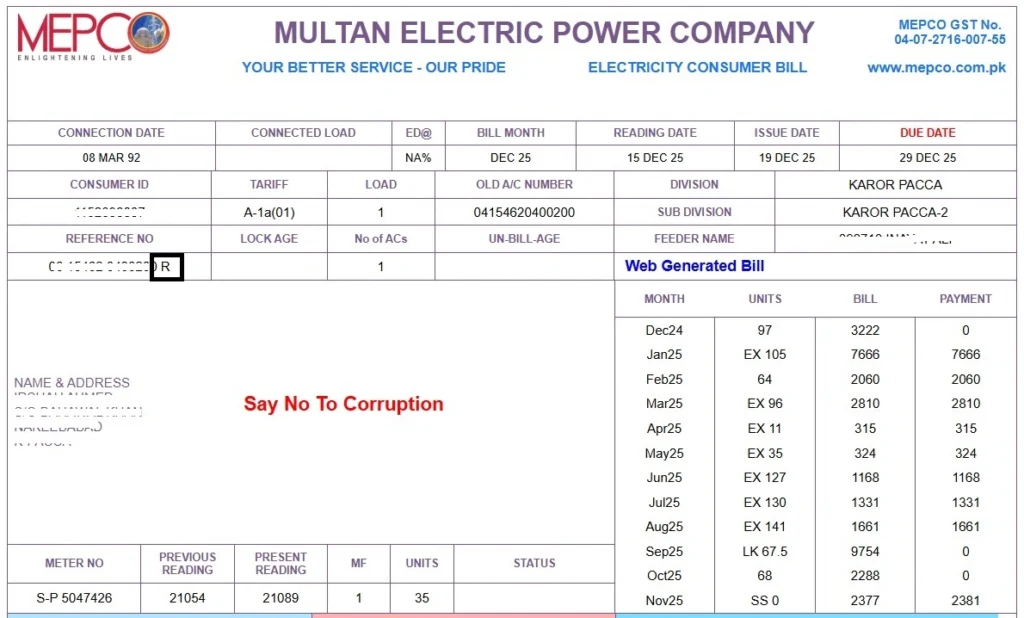
If the status of your bijli bill is “R”, choose “R” from the dropdown. And if your WAPDA bill satus is “U”, choose “U” from the dropdown. This bijli bill status is shown in front of your reference number, see the following image:
How to find Reference Number and Consumer ID in your MEPCO Bill?
Reference Number and Consumer ID are mention at the top left corner of your MEPCO Bill. Look at the following image:
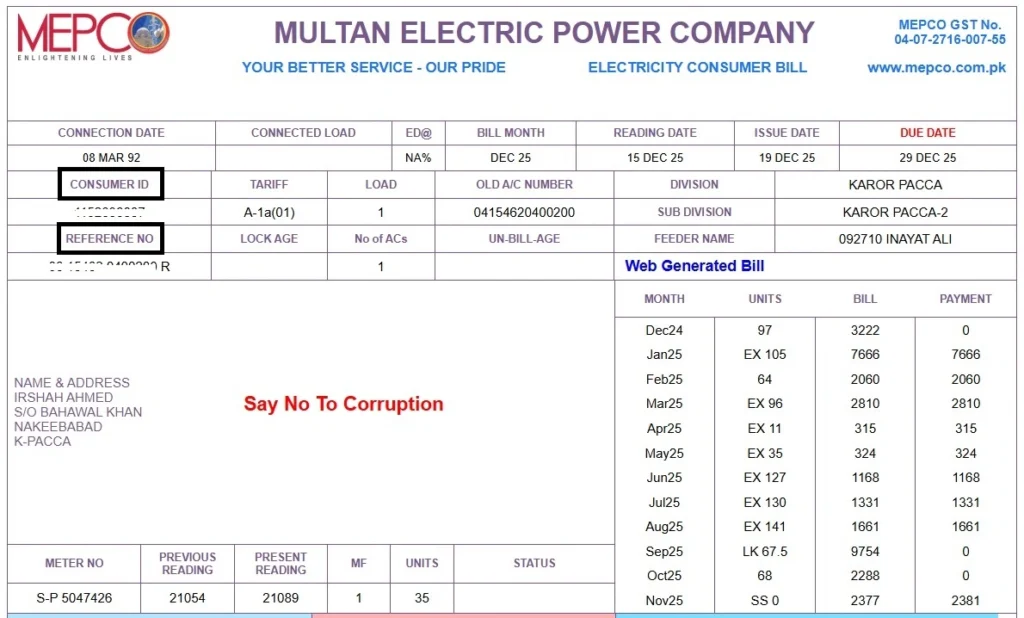
Note: It is important to know about your MEPCO bill reference number and consumer ID because it will help you to do wapda bill check online for MEPCO Multan.
What is MEPCO
MEPCO (Multan Electric Power Company) is a government owned electricity distribution company in Pakistan which generates electricity from water (hydro-electric power). It is responsible for regulation and distribution of electricity in 13 districts of South Punjab. Furthermore, it issues bills, and maintains power infrastructure across this region.
It was established in 1998. It operates under PEPCO (Pakistan Electric Power Company), and follows the policies and rules of NEPRA (National Electric Power Regulatory Authority).
Today MEPCO (Multan Electric Power Company) serves 8,915,282 customers. It has 159 grid stations, 1945 feeders, 205,000+ transformers, and 128,239Km HT/LT Lines. It provides the facility to check bijli bills online as well.
⚡ MEPCO Service Coverage Areas
MEPCO (Multan Electric Power Company) provides electricity distribution services across the following major districts of South Punjab.
Origin of MEPCO
The origin of MEPCO electric is traced back to the 1922 (British India-era) when MEPCO was established under the name Multan Power Supply Company. After the independence in 1947, Multan Power Supply Company came under the governance of government of Pakistan, and in 1972 it was nationalized.
After nationalization, the electricity distribution, billing, and management was managed centrally by WAPDA. For Multan region WAPDA had its sub-unit called the Multan Area Electricity Board (MAEB). The MAEB was responsible for supplying electricity to the consumers of this region.
But with the population growth, the energy demand also increased. To meet this demand, the government of Pakistan decided to unfold WAPDA. As a result of this unfolding, several DISCOs (Distribution Companies) like MEPCO, QESCO, FESCO, GEPCO, LESCO etc. were established.
MEPCO was formally established on May 14, 1998, and started its operations on June 09, 1998 after taking over the assets, staff, and infrastructure from the former Multan Area Electricity Board.
What is MEPCO Bill
A MEPCO Bill is a monthly electricity bill invoice that MEPCO (Multan Electric Power Company) users receive every month. It shows the total amount they have to pay for the electricity units (bijli) they have consumed. This MEPCO bill is also called bijli ka bill or bijali bil.
In this bijli bill, MEPCO charges and other government taxes are included. The implication of these taxes is different for each category of electricity consumer, such as residential, commercial, or industrial etc.
What is MEPCO Duplicate Bill
Let’s say you have lost the original bill invoice that you got from MEPCO, or you haven’t received any invoice at all. So in this situation what you can do is to get the copy of your bill. This copy of your bijli bill is called MEPCO Duplicate Bill.
The easiest method you can get this duplicate bill is from mepcobll.com. Just put your reference number or consumer ID, click the “Submit” button, and you will be redirected to your “bill” page, on this page you will see green color button named “Print”, click at it, and your MEPCO bill will be printed. And that printed bill will be your MEPCO Duplicate Bill.
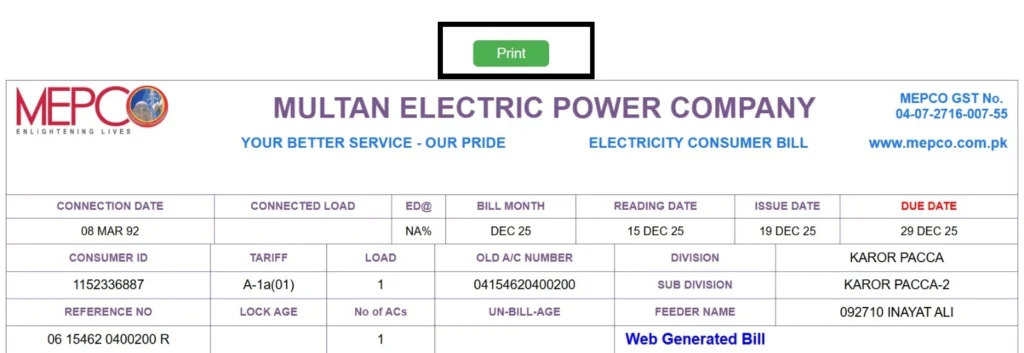
Or you can visit your nearest MEPCO office to get the duplicate copy of your electricity bill.
Is There Any Difference Between an Original and a Duplicate Bill?
There is no practical difference. Both contain:
- A 10-digits consumer ID
- A 14-digits reference number
- Units consumed during the month
- And total amount due.
- Only difference may be a “Duplicate” watermark on the copy.
What are MEPCO Bill Charges
MEPCO Bill charges are the cost of electricity that a user of MEPCO consumes along with government taxes. These charges include the cost of electricity units consumed, fixed charges like meter rent, and other government taxes like GST, income tax, retailers tax etc.
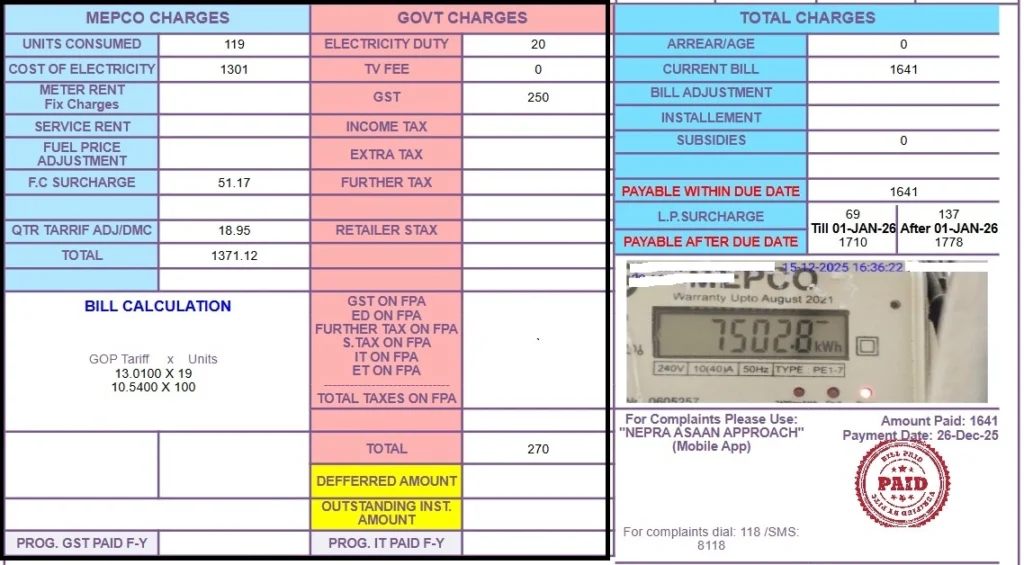
As you can see in the above image that there are 2 type of charges included in this WAPDA Bill: MEPCO Charges and Government Charges. So let’s discuss each of these charges in detail:
MEPCO Charges in MEPCO Bill
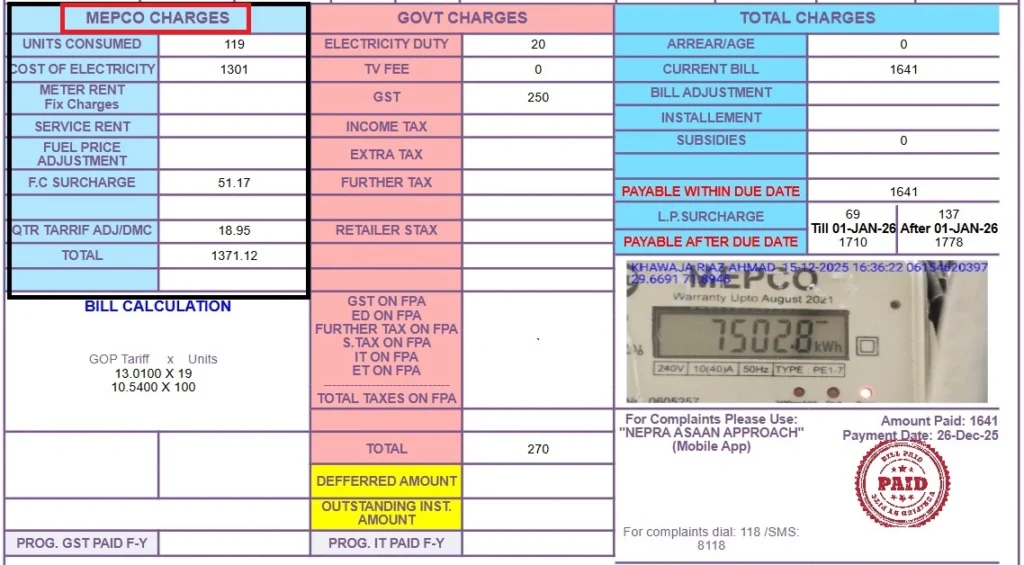
MEPCO charges are not taxes, they are the cost of electricity production and supply. MEPCO charges its users based on how much units they consume. So following are the charges that are applied to an electricity user by MEPCO:
Units Consumed:
Units consumed are the number of electricity units that the MEPCO users consume in the whole month. The more units you consume, the higher the bill price would be.
Cost of Electricity:
Cost of electricity is calculated by multiplying the number of units you consumed by tarrif rates. So the equation is:
Cost of electricity = units × tariff rate
Meter Rent (Fixed Charges):
Meter rent is a fixed charge. It is the rent of MEPCO meter that the consumers use. This rent remains the same.
Service Rent:
Service rent is the cost for the maintenance of electricity lines that are responsible for the transmission of electricity to your household, or business.
Fuel Price Adjustment (FPA):
Whenever the fuel price changes in Pakistan, the cost for electricity production changes. MEPCO adjusts these prices in the bill as well. If the fuel price goes down, the electricity production cost will go down, and hence, the bill charges will drop. And vice versa.
F.C. Surcharge (Financial Cost Surcharge):
F.C. Surcharge is an extra charge added to your electricity bill to cover the financial gap, loss, or debt of the power sector. The government has to borrow money to produce and supply electricity, and it has to pay debt on this borrowed money. To cover this debt F.C. surcharges are imposed.
QTR Tarrif Adjustmen / DMC:
Quaterly Tarrif Adjustment (QTR Tarrif Adjustment / DMC) is an extra adjustment in your monthly electricity utility bill to balance the actual cost of production. These adjustments are made because the the electricity production cost changes with fluctuations in dollar rates and fuel prices.
After every 4 months, NEPRA reviews these cost changes. If the cost is increased, you will be charged more. Or if the cost is decreased, you will be charged less in your bill.
Total MEPCO Charges:
It is the sum of all of the above MEPCO charges. This total does not include government charges / taxes.
Government Charges in MEPCO Bill
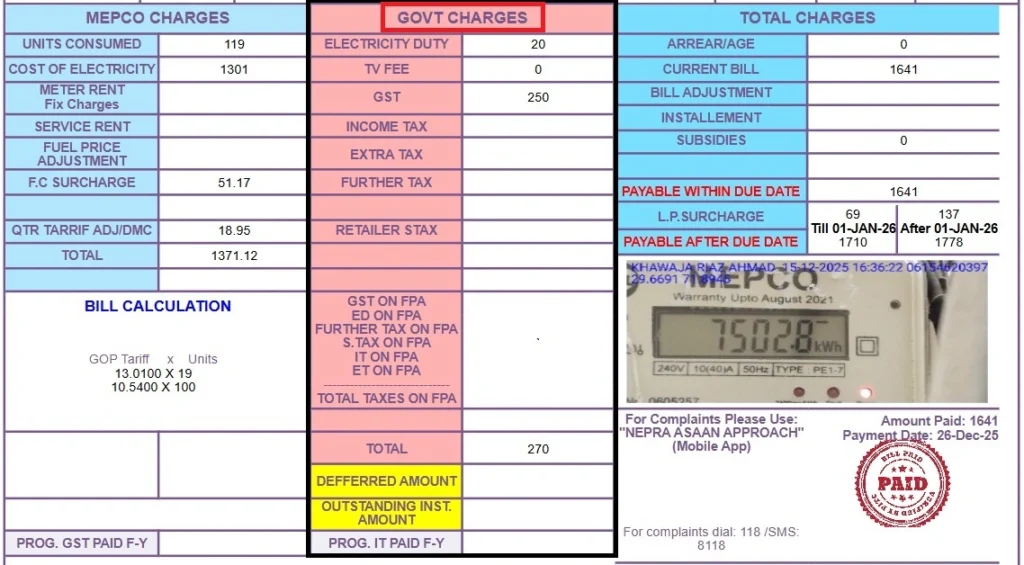
Government charges in MEPCO Bill are the taxes imposed by the federal and provincial government of Pakistan. The taxes like GST (General Sales Tax), Income Tax, Fuel Price Adjustmen (FPA) are imposed by the federal government. While the taxes like Electricity Duty, and TV fee are imposed by the provincial government (Government of Punjab).
Moreover, these taxes are collected by MEPCO, and MEPCO passes these taxes to the federal and provincial governments. These taxes are imposed to fund pubilc services like infrastructure, broadcasting, and administration. Let’s understand each of these taxes in detail:
Electricity Duty (ED):
Electricity Duty (ED) is a provincial tax imposed on the electricity usage. It means the more electricity you use, the more duty you pay.
Electricity Duty (ED)=Electricity Cost×ED Rate
MEPCO collects this tax, and passes it to the government of Punjab.
TV Fee:
TV Fee is a fixed monthly charge for Pakistan Television (PTV). Usually, it is 35 rupees. And for some users it can be zero as well.
General Sales Tax (GST):
General Sales Tax (GST) is the federal sales tax. It is applied to your electricity charges, which is why it becomes the largest tax component in your bill. MEPCO collects it for the Federal Government.
GST= Electricity Charges × GST Rate
This equation shows higher the electricity charges, higher the GST.
Income Tax:
Income tax is applied to high electricity users like the industrial, and commercial users. This tax is not applied to the normal household if their electricity units consumption is below the government set limits. This tax is imposed by the federal government.
Extra Tax:
Extra Tax is charged by the Federal Government of Pakistan to the non-filers. Commercial, and industrial (non-filer) users are mostly affected by this tax. This tax is imposed to encourage the business owners to become filer.
Further Tax:
Further tax is an additional tax imposed by the federal government. This tax is charged on commercial and industrial users when required by the tax laws.
Retailer Tax:
Retailer tax is applied by the federal government to the shopkeepers and retailers.
Taxes on FPA (Fuel Price Adjustment):
Following government taxes are applied on the FPA amount: GST, Electricity Duty (ED), Income Tax, and Extra / Further Tax.
Total Government Charges:
Total Government Charges are the sum of all of the above mentioned charges: Electricity Duty (ED), TV Fee, General Sales Tax (GST), Income Tax, Extra Tax, Further Tax, and Retailer Tax.
Note: You’ll see all of these MEPCO and government charges mentioned on your bijli bill when you do MEPCO bill check through mepcobll.com. Moreover, you can estimate your MEPCO bill Multan by using MEPCO bill calculator at https://mepcobll.com/bill-calculator/
Tips to Reduce Your MEPCO Bill
It is possible to reduce your monthly MEPCO bill if you manage your electricity units consumtion wisely. Following are the tips that you can follow to save money on your MEPCO electricity bills:
Stay Within Lower Tariff Slab
MEPCO charges its electricity consumers based on the tariff slabs. The higher electricity units consumption will push you towards the higher tariff slabs, and per-unit rate is higher in the higher tariff slabs.
That’s why keep track of your monthly electricity units consumption, and stay in the lower tariff slabs so that you pay lower per-unit charge for the electricity you have consumed.
Avoid MEPCO Peak Hours
Do not use appliances that consumes more energy during peak hours MEPCO. These heavy appliances include washing machines, irons, water pumps, ovens, and AC etc.
The usage of these appliances druing the peak hours is not recommended because during peak hours the per-unit cost of electricity is higher. That’s why if you do not use electricity during these peak hours, it will help you reduce your electricity bill. You can use electricity during the off-peak hours because per-unit electricity rate is lower during these hours.
The following table shows you the MEPCO peak hours and MEPCO off-peak hours:
Season | Month | MEPCO Peak Hours | MEPCO Off-Peak Hours |
Summer | June – August | 7:00 PM – 11:00 PM | Remaining 20 Hours |
Spring / Autumn | March – May, September – November | 6:00 PM – 10:00 PM | Remaining 20 Hours |
Winter | December – February | 5:00 PM – 9:00 PM | Remaining 20 Hours |
How to Check Your MEPCO Online Bill
To check your Bijli (MEPCO) ka Bill online, put your reference number or consumer ID in the following tool, click “Submit”, and you will be redirected to your bill.
Search Your Electricity BillMEPCO Bill SMS Service
You can do MEPCO bill check via SMS. To check your MEPCO bill through SMS, you just have to type “PITC <14-digit Reference Number>”, and send it to 8075.
Another MEPCO SMS service that you can get is by typing “REF <14-digit Reference Number>”, and sending it to 8334.
How to pay your MEPCO Online Bill?
Paying MEPCO Bill Online is exceptionally easy, and it does not take more than 2 minutes to pay your bijli ka bill. You can pay your MEPCO Bill through Jazcash, Easypaisa, or different banking apps.
MEPCO Bill Payment Using Jazcash
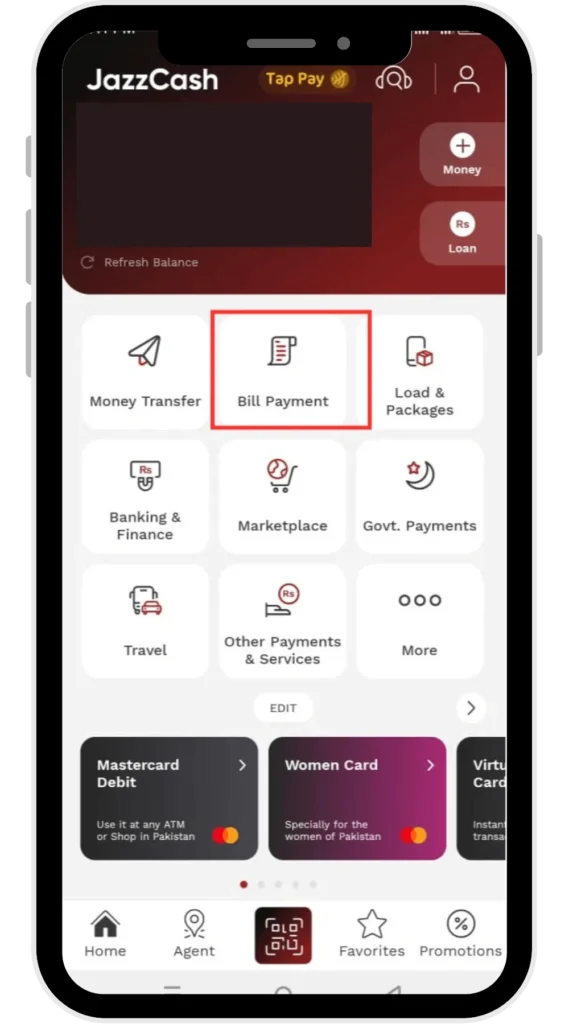
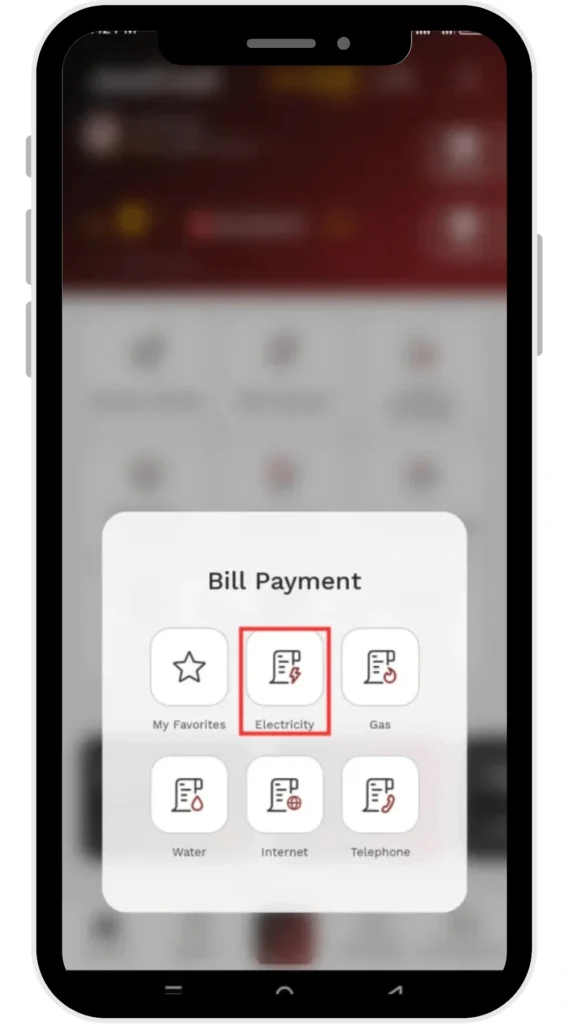
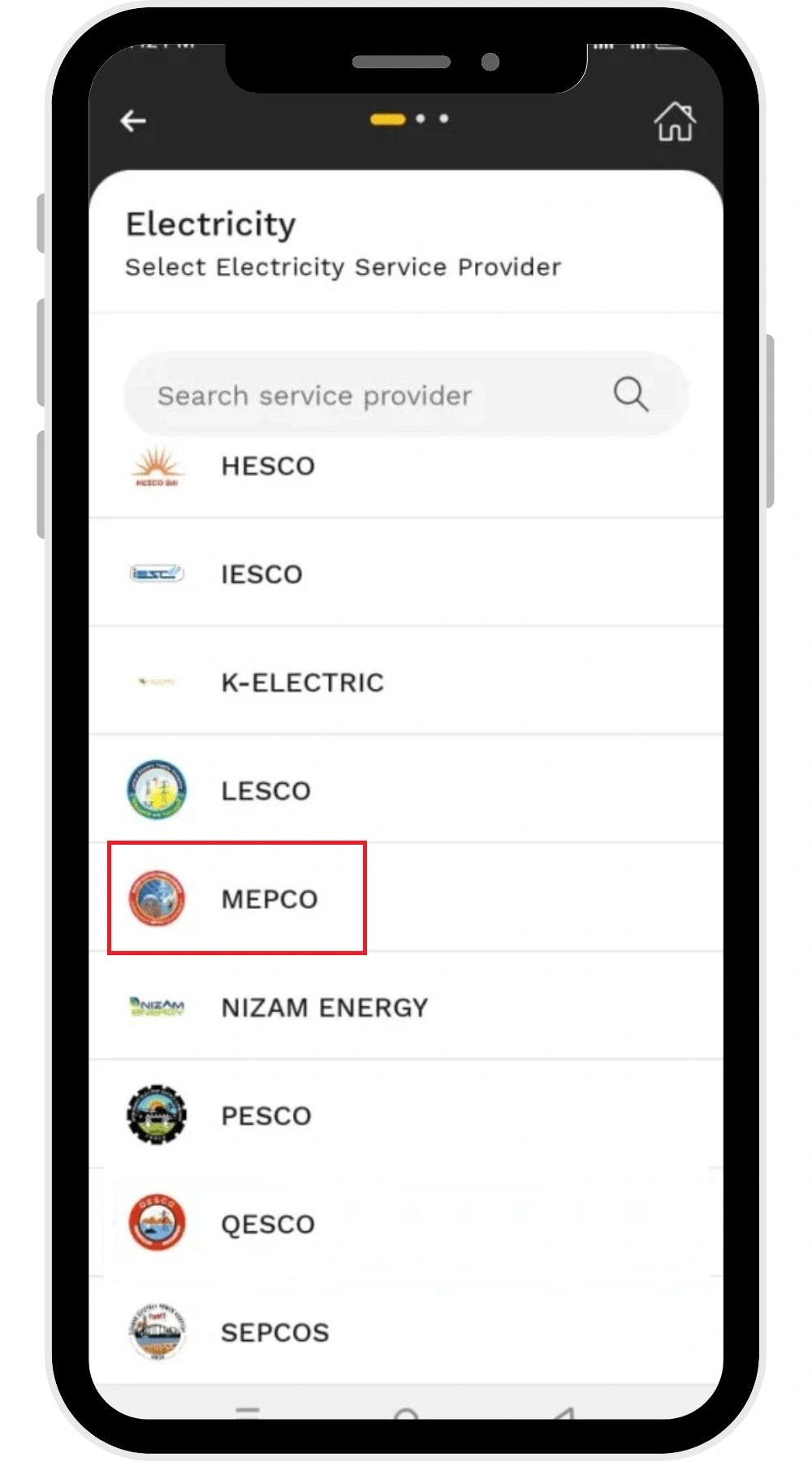
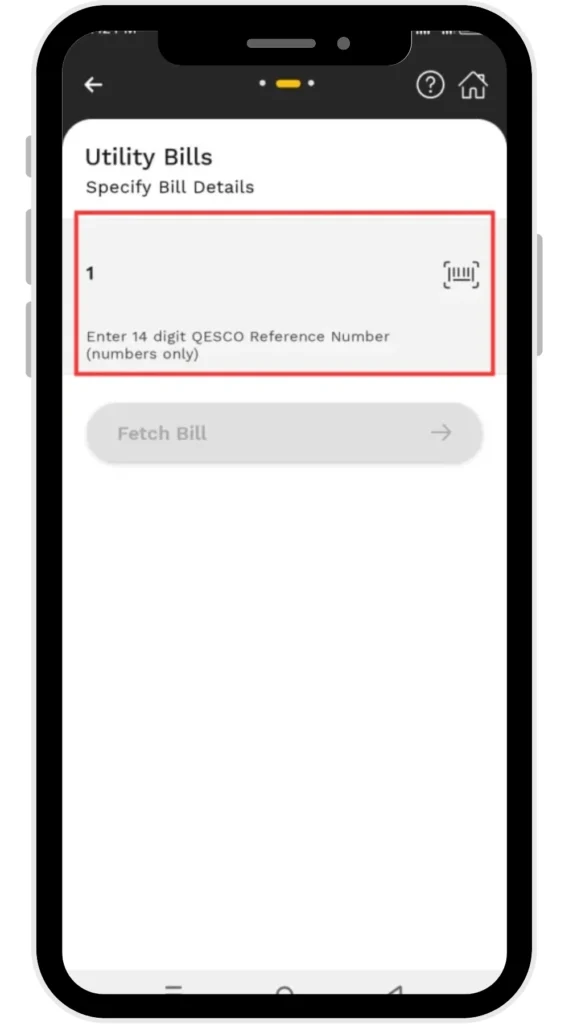
Follow the following steps to pay your bijli bill through Jazcash:
- Login to your Jazcash account
- Tap “Bill Payment”
- Inside “Bill Payment” option you will find “Electricity” (Tap at “Electricity”)
- Choose MEPCO
- Enter your 14 digit MEPCO reference number
- Confirm the payment
MEPCO Bill Payment Using Easypaisa
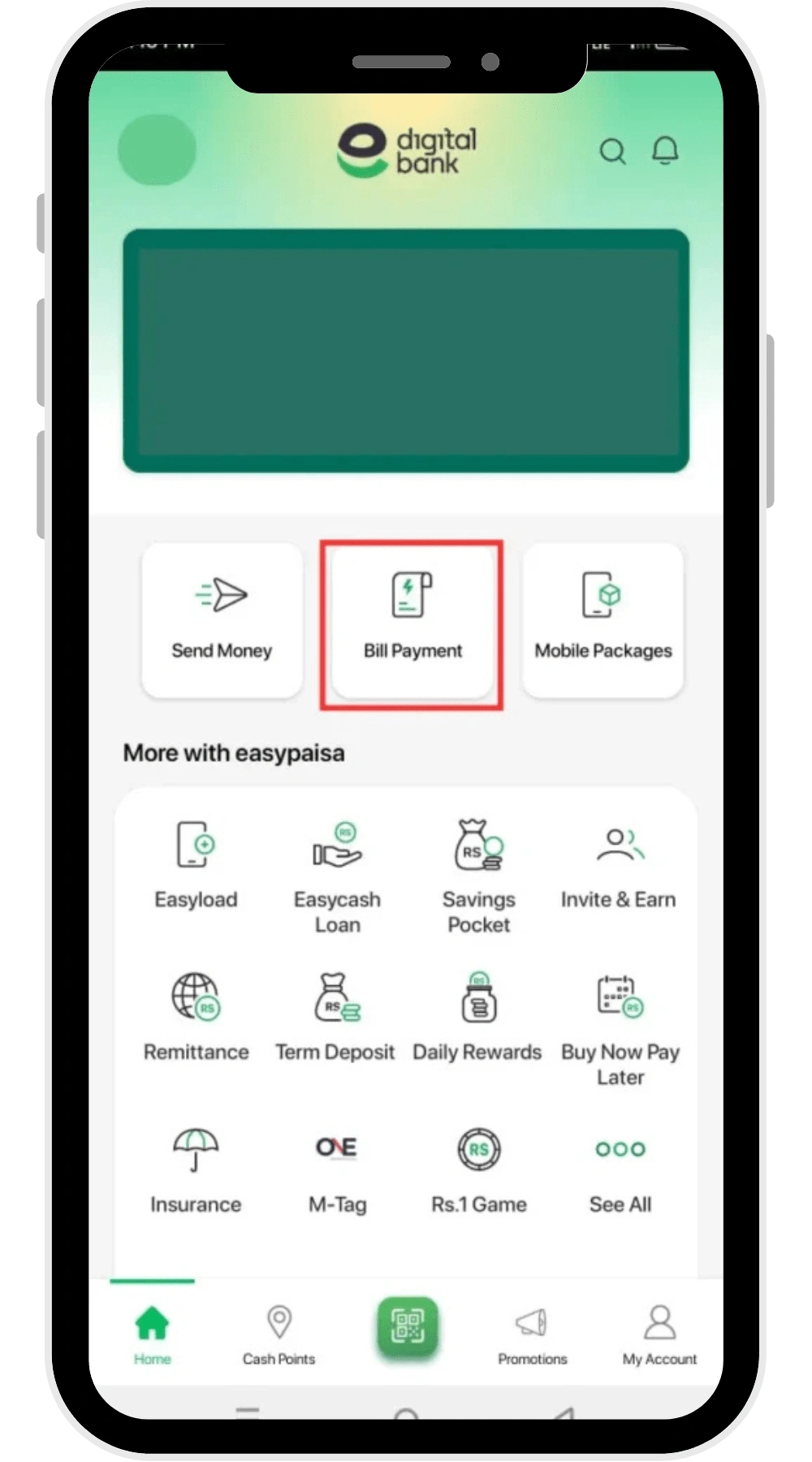
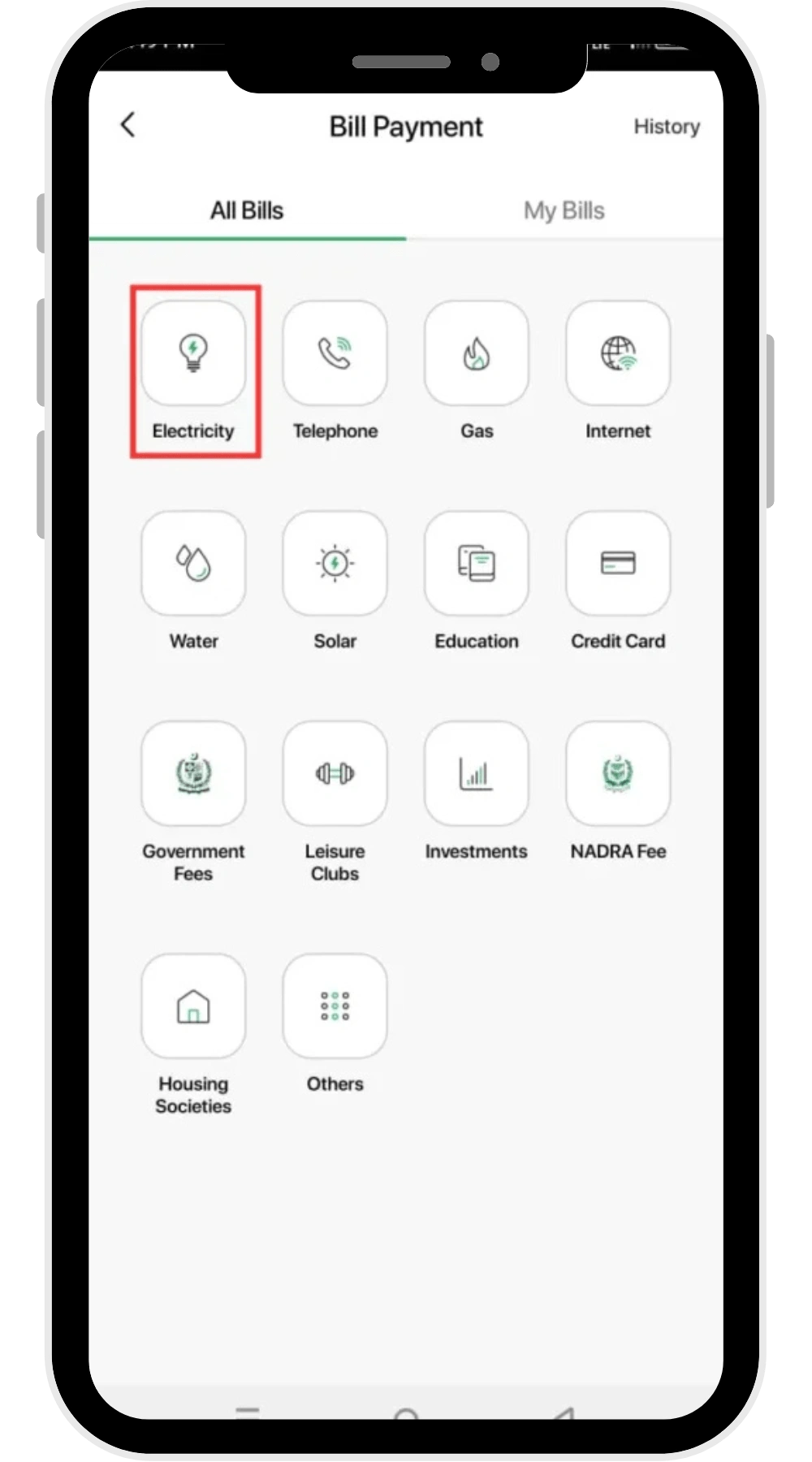
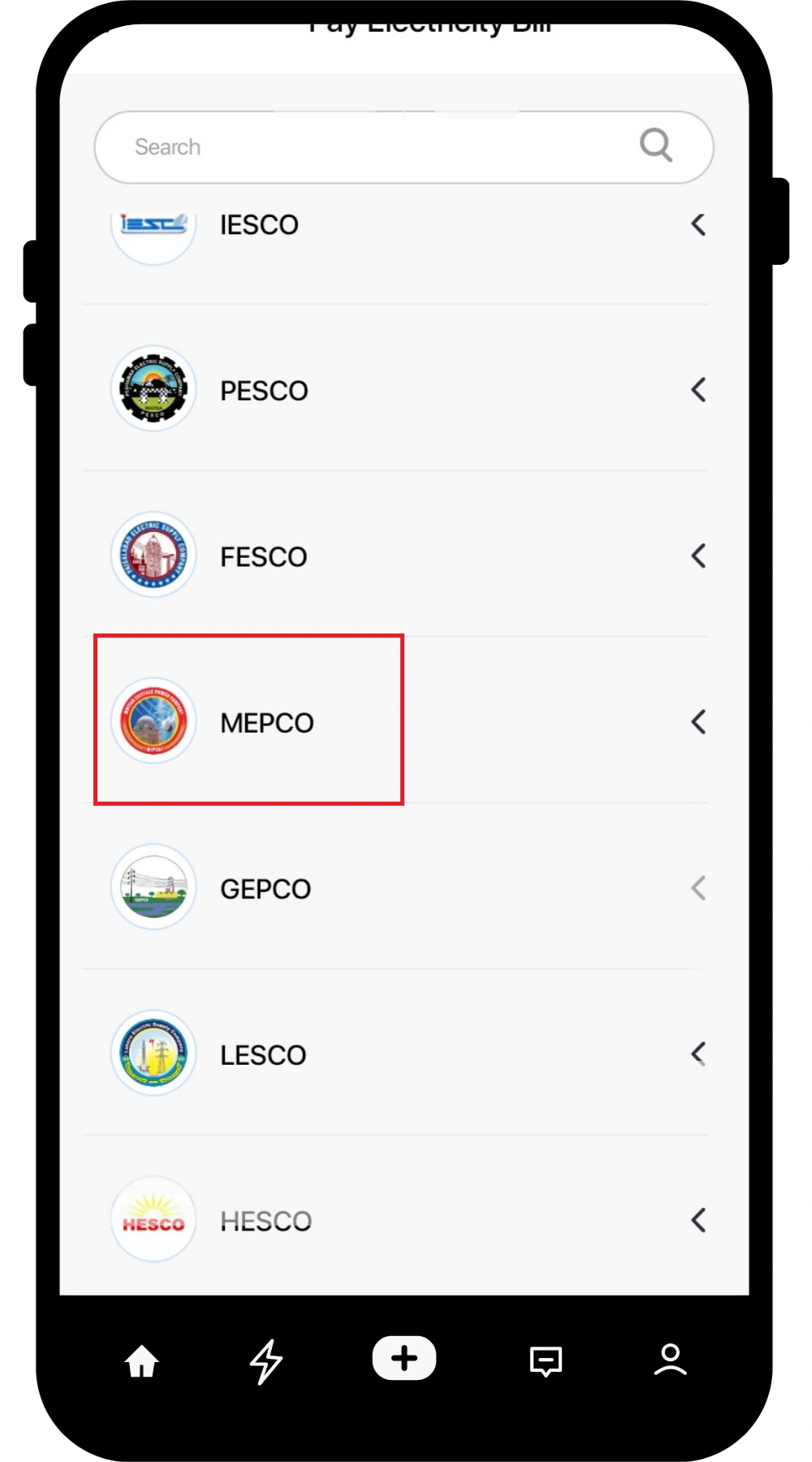
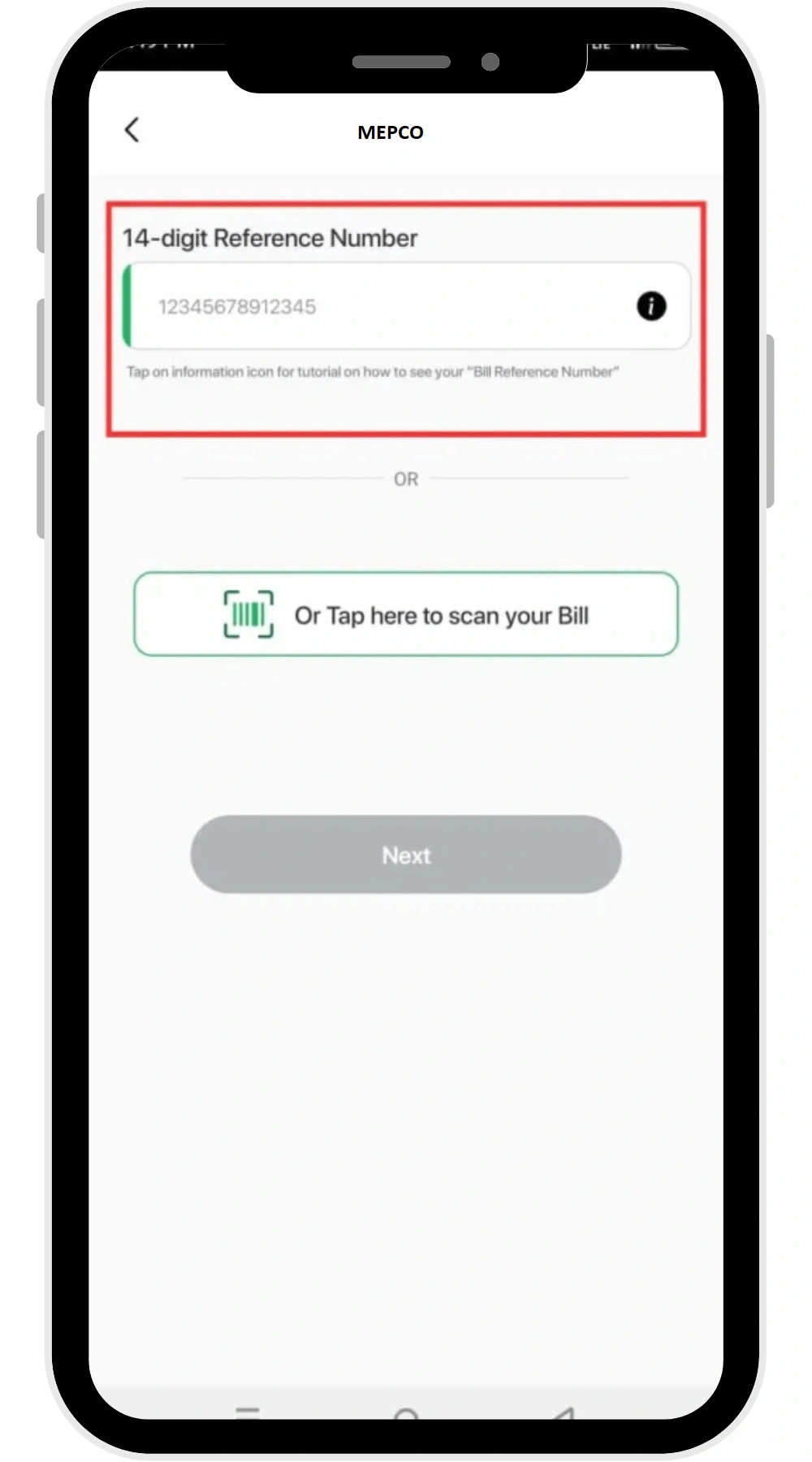
By using the following simple steps, you can pay your electricity bill easily:
- Login to your Easypaisa account
- Tap “Bill Payment”
- Tap “Electricity”
- Choose MEPCO
- Enter your 14 digit MEPCO reference number, or you can choose to scan your bill QR code.
- Confirm the payment
MEPCO Bill Payment Using Bank Apps
Following are the steps that you can use to pay your online bijli ka bill:
- Login to you bank account
- Go to the “Bills” section
- Choose “MEPCO” from the list
- Enter your reference number
- And confirm the payment
How to pay your MEPCO Bill Offline?
Once you have done bijli ka bill online check, then you pay your bijli ka bill for MEPCO. Paying your MEPCO Bill online is easier and faster than paying it offline. But if you still want to pay it by hand, you can do it throug the following mediums:
- Physical Stores, such as retail, and mobile shops
- Bank Branches like UBL, HBL, Meezan, MCB etc.
- Post Offices
Go to any of these locations, and pay your electricity bill by hand.
How to check if your MEPCO Bill is paid or not?
You can check your bill payment status by putting your reference number in the MEPCO Bill Check tool at mepcobll.com . This will help you to do bijli bill check and its status (paid/unpaid). If your bill is paid, you will see a stamp on it, as shown on the following image:
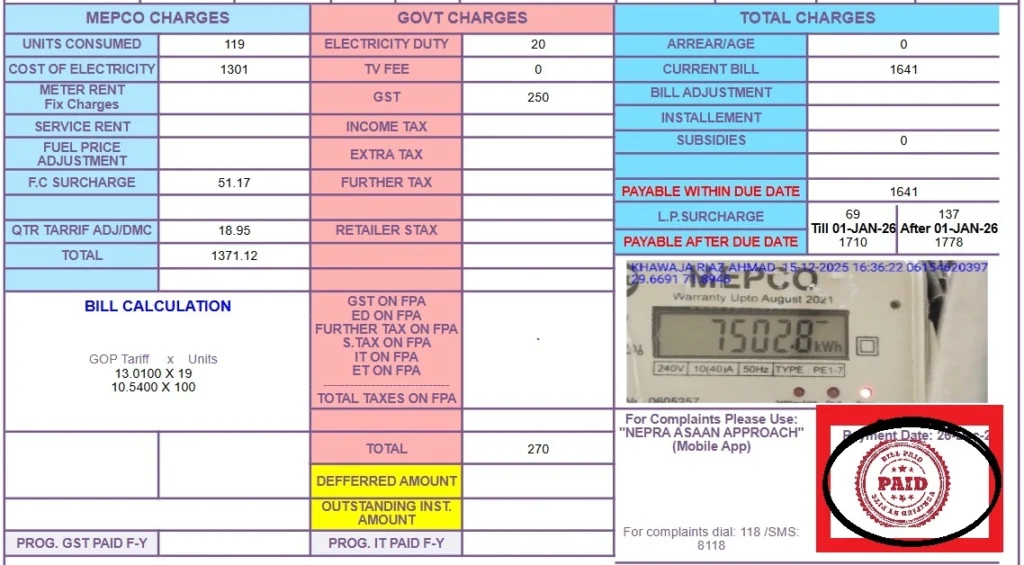
And if this stamp does not appear on your MEPCO bill, or MEPCO Duplicate bill, it means your bill is not paid.
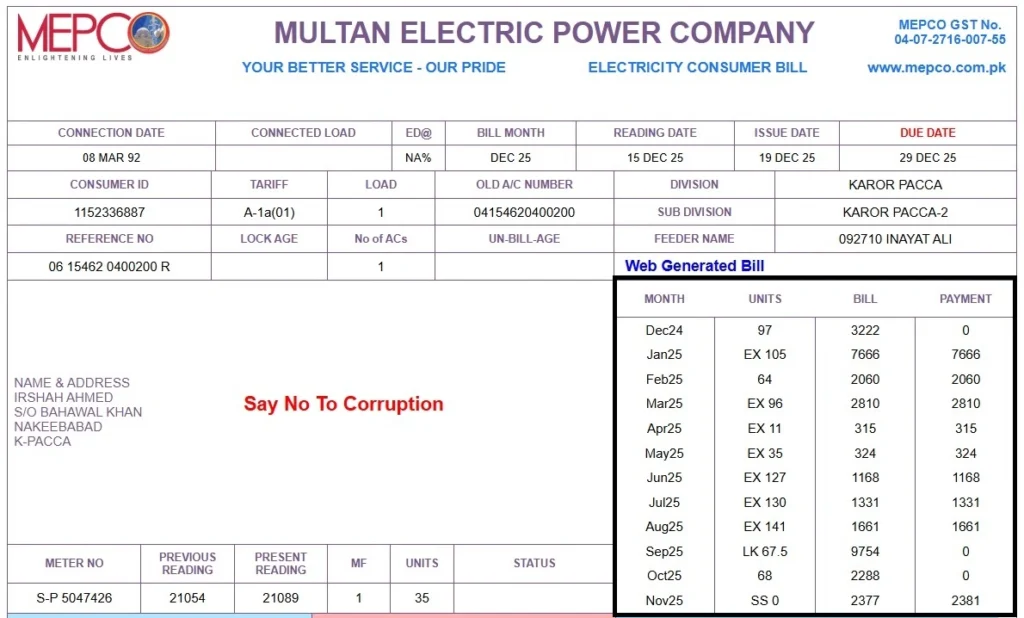
How to check MEPCO Bill payment history?
On the right side of your bill, the history of your last 12 months bill is presented.
Important Note: If are searching for: بجلی کا بل چیک کرنا, bijli ka bill online check, bijali ka bil check karna hai, بجلی کا بل آن لائن چیک کرنا, آن لائن بل چیک, this guide is for you. You can easily check your bill on this webiste and get all the information about your MEPCO Bill.
MEPCO Complaint Whatsapp Number
If you have any issue related to your to MEPCO online bill, MEPCO bill check, or MEPCO net metering, you can contact at this MEPCO complaint whatsapp number: 03105404444, or you can use WAPDA helpline number Multan: 0619220198.
This number is of Public Information Officer (PIO) MEPCO office. Here you can submit your queries related to your electricity bills related issues.
Another way to submit your complaints about MEPCO services like MEPCO online bill check, is by using MEPCO apps like MEPCO Samrt App, Power Samrt App or MEPCO Light.
FAQs
Conclusion
Checking your MEPCO Bill Online is super easy. You just have to come to mepcobll.com, enter the reference number, or Consumer ID of your MEPCO electricity bill, click the “Submit” button, and your MEPCO bill will be shown to you.
MEPCO has made this digital advancement to facilitate its electricity consumers. This online bill checking service of MEPCO allows its users to check their electricity bills anytime and anywhere through mepcobll.com
Important Note!
Our respected visitors! We hope the information that you found on our website is useful for you. So if you still need any guidance related to your MEPCO Bill or MEPCO, feel free to contact us on our office mobile phone number at 03001878084.